Field-First Creative Systems
Use yourself, your real footage, or your AI avatar.
Why real camera capture, field walkthroughs, and studio-grade AI presenters belong in one governed workspace — and how consolidating nine disconnected software categories eliminates the translation tax.
A residential agent walking through a sunlit kitchen twenty minutes before an open house should never look synthetic. Neither should an account executive recapping the exact objection raised on a Tuesday discovery call, or a product lead pointing at a live screen to answer a customer question.
Yet the moment that raw recording stops, most teams get punished for choosing authenticity. Someone exports the phone clip to strip out hollow room echo. Someone else uploads it to burn captions, opens another tab to crop vertical and square cuts, drops the file into a standalone video-email tool, and then rebuilds the post copy from scratch inside a separate social scheduler.
At the other extreme, a wave of generative video products assumes every message should come from an automated digital twin — turning relationship-driven professionals away at the door. Both approaches force a false choice. Modern creative operations should start with the real human in the room, preserve every ounce of raw field proof, and keep studio-grade AI presenters ready on the bench when scale or rapid updates actually call for them.
What happens at zero AI generation credits.
The fastest way to tell whether a creative platform respects real operators is to ask what it can do before you spend a single generation credit. In Aion, AI video and image generation is 100% optional. Real camera footage, screen walkthroughs, and job-site photos are first-class citizens inside Aion Workspace Cloud from day one.
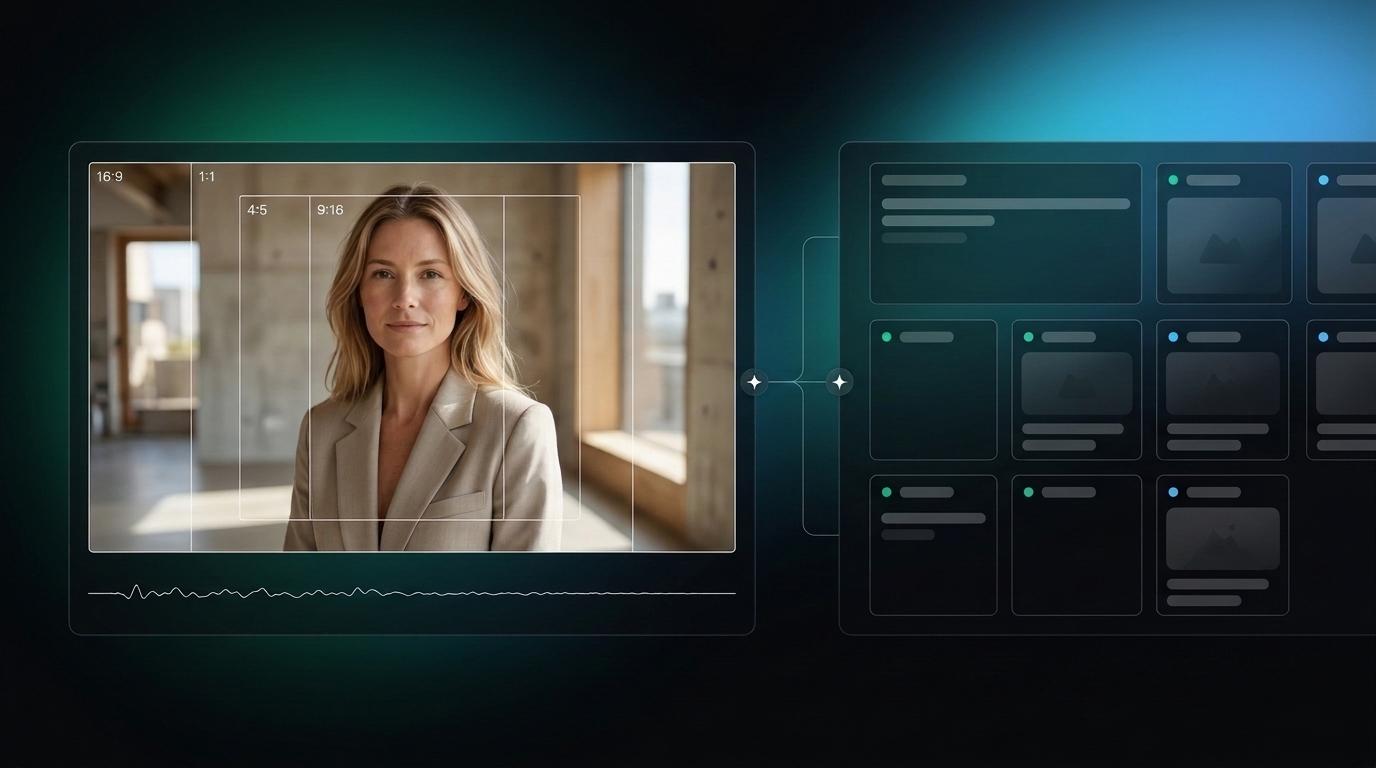
Open Create on desktop or tap the centered camera button in the mobile dock — with voice dictation built right beside every input bar — and record yourself or your screen in one tap. Studio audio cleanup strips out tile bounce, HVAC hum, and laptop mic echo automatically while keeping your natural cadence intact. From that single authentic source, Aion burns clean captions and spins $0 4-Format Asset Packs (16:9 widescreen, 9:16 vertical short-form, 4:5 portrait feed, and 1:1 square) inside Projects without forcing anyone into a multi-track timeline editor.
That same clip immediately works across relationship follow-up and organic distribution. Wrap it in a revocable /media/share preview page for 1:1 video email through Gmail, Outlook, or your verified domain. Or let Content Engine pair your footage with live fresh-page detection from your website, country-accurate holiday awareness across US, Canadian, and global calendars, saved Offer rotation in Auto-mix, and native scheduling across seven social channels: LinkedIn, Instagram, Facebook, X, TikTok, YouTube, and Pinterest.
Authenticity is how you earn trust in the room. Leverage is how that single take reaches a prospect's inbox, seven social channels, and next quarter's onboarding library without nine separate logins.
Ending the nine-tab translation tax.
Lean teams rarely notice how expensive their video and content stack has become because each subscription was purchased to solve one isolated bottleneck. Added together, operators routinely spend $400 to $900+ per month — and lose hours of context every week — shuttling files across nine disconnected software categories that Aion consolidates into one workspace:
011:1 personal camera video email
Replaces $39–$69/moCapture real camera video at $0 credits, clean room echo automatically, wrap in a revocable /media/share preview page, and send 1:1 from your connected inbox.
02B2B sales video and CRM messaging
Replaces $59–$89/seatRecord personalized camera or screen recaps after discovery calls, keep HubSpot deal context aligned, and move prospects forward with real proof.
03Async screen and camera walkthroughs
Replaces $15–$20/seatLaunch browser or desktop screen-plus-camera demos in one click with revocable preview links and workspace-level review.
04Short-form captions, audio polish, and multi-aspect cuts
Replaces $15–$39/moTurn raw phone walkthroughs or studio clips into captioned $0 4-Format Asset Packs (16:9, 9:16, 4:5, 1:1) with zero timeline complexity.
057-channel social scheduler and drag-and-drop calendar
Replaces $30–$249/moPreview, approve, and schedule across LinkedIn, Instagram, Facebook, X, TikTok, YouTube, and Pinterest on a unified Month and Week calendar.
06Location- and offer-aware topic ideation
Replaces $29–$99/moDetect fresh pages on your live website, honor accurate local holidays for your market, and rotate saved Offers automatically inside Content Engine.
07Brand-locked multi-placement design packs
Replaces $15–$30/moKeep saved Brand, Product, Offer, and Setting vaults attached to every visual and video cut so nothing drifts off-brand between formats.
08Multichannel Email + LinkedIn sequences
Replaces $49–$99/moOn paid Aion Pro ($99/mo, excluded from trial and Starter), stage Context-grounded sequences and verify every step upfront with Fast-Forward Test Run.
09Optional speaking AI avatars and 1-scene SOP updates
Replaces $58–$178/moDirect consented 8s–120s presenter stories with calibrated voice, and remix only one changed SOP scene later under an exact upfront credit quote.
Consolidating those nine categories does more than trim software invoices. It keeps your Brand Context, raw Library clips, approved claims, and review history attached to the asset from capture through distribution.
Side-by-side: nine disconnected point tools vs. one Context-locked studio.
Without naming individual vendors, here is how a typical stitched-together marketing and video stack compares against running capture, creative adaptation, social scheduling, and video follow-up inside Aion Studio:
| Capability | Disconnected Point Tools | Typical Spend | Aion Studio |
|---|---|---|---|
| 1:1 camera video email & preview pages | Separate browser extension, unbranded player links, isolated contact history | $39–$69/mo | Included ($0 camera capture, studio audio polish & revocable /media/share links) |
| Async screen + camera product demos | Per-seat screen recorder with no connection to social posts or CRM | $15–$20/seat | Included ($0 browser screen + live camera bubble inside Create) |
| B2B sales video & CRM deal recaps | Dedicated sales-video subscription billed per rep seat | $59–$89/seat | Included (Context-grounded recaps + native CRM & inbox handoff) |
| Short-form captions & multi-aspect cuts | Manual export into a standalone caption/clip editor for every format | $15–$39/mo | Included ($0 burned captions + $0 4-Format Asset Packs: 16:9, 9:16, 4:5, 1:1) |
| Multi-placement brand templates | Separate design tool where brand kits drift across team members | $15–$30/mo | Included (Brand, Product, Offer & Setting vaults locked automatically) |
| 7-channel social scheduler & calendar | Standalone publishing tool requiring manual copy-paste and file re-uploads | $30–$249/mo | Included (LinkedIn, IG, FB, X, TikTok, YouTube & Pinterest + Post Review) |
| Website- & offer-aware topic signals | Generic AI prompt templates with zero awareness of live pages or offers | $29–$99/mo | Included ($0 live-site signal detection, regional calendar & Offer rotation) |
| Multichannel Email + LinkedIn sequences | Separate outbound sequencer disconnected from video & brand approvals | $49–$99/mo | Included on paid Aion Pro ($99/mo) with Fast-Forward Test Run |
| Speaking AI presenters & 1-scene SOP updates | Standalone avatar studio requiring full re-renders when one step changes | $58–$178/mo | Included (consented 16:9/9:16 presenters + targeted 1-scene SOP remix quotes) |
| Combined monthly footprint | $310–$870+/mo across 9 logins & manual file handoffs | One Context-locked workspace ($29/mo Starter · $99/mo Pro) + exact upfront media quotes | |
The hybrid capture-to-distribution loop
- 01Record yourself, your screen, or field footage at $0 credits — or select a consented studio avatar when filming live isn't practical.
- 02Let studio audio cleanup, burned captions, and saved Brand Context prepare a $0 4-Format Asset Pack (16:9, 9:16, 4:5, 1:1) inside Projects.
- 03Share immediately via a revocable /media/share link for 1:1 video email, or stage native previews across up to seven social channels.
- 04When one step in a training, onboarding, or product walkthrough changes later, quote and remix only that single scene instead of re-shooting.
- 05Approve every credit quote, visual, and publishing destination explicitly — nothing spends credits or sends externally without human sign-off.
What hybrid execution looks like across five real roles.
Different teams lean on raw footage and studio automation in different ratios. Keeping both inside one system lets each operator match the medium to the moment:
Realtor & field consultant
Walks a new listing on a phone camera at $0 credits, strips out hallway echo, sends a personal 1:1 video email via a revocable /media/share page to relocating buyers, and schedules the 9:16, 4:5, and 16:9 cuts across social before leaving the driveway.
B2B sales & RevOps
Captures a 45-second screen-and-camera recap right after a discovery call, logs the preview link to HubSpot, and — on paid Aion Pro — pairs shared video proof with an Email + LinkedIn sequence checked first in Fast-Forward Test Run.
Product & onboarding lead
Turns a release note or internal SOP into a captioned 16:9 presenter walkthrough, distributes it via a revocable link, and updates only Scene 3 next quarter when an interface step changes — approving an exact single-scene credit quote instead of re-recording.
Lean marketing team
Connects the live company domain and seasonal Offers to Content Engine so newly published pages and country-accurate holidays generate grounded draft angles automatically, ready for one-click human review.
Multi-brand agency
Isolates each client's Brand vault, consented studio presenters, raw field Library, $0 4-Format Asset Packs, and client approval sign-off without multiplying nine per-seat tool subscriptions across every account.
Universal by design, personalized to your exact use case.
Consolidating nine tools only works if the studio never buries you in nine tools' worth of clutter. When you connect your brand, website, or social page during onboarding — and toggle on $0 Personalized Signals — Aion adapts its Create workspace and topic recommendations around how your specific business wins attention, without ever locking out freeform ideas.
A software founder opening Create sees immediate paths for 16:9 product walkthroughs, updatable employee or customer training videos, and multi-channel launch posts. A residential broker sees listing walkthroughs and 1:1 buyer follow-ups. A legal or advisory practice sees plain-English FAQ explainers and intake prep clips; an outdoor consumer brand or field-operations team sees product showcases, crew safety briefings, and job-site proof. The underlying engine stays universal, while the starting surface meets every operator in their own language.
Why native execution inside Claude, ChatGPT, and Gemini changes daily rhythm.
Even the best standalone video editor or social scheduler still lives on an island away from where modern teams think and plan. Strategy notes, positioning angles, and launch briefs increasingly start inside Claude, ChatGPT, or Gemini — and traditionally stall the second someone has to copy text out of chat and rebuild media manually in five browser tabs.
Create with Aion bridges that gap directly. Because the exact same Aion Workspace Cloud connects natively to Claude, ChatGPT, and Gemini alongside Web Studio and Mobile, your AI assistant can inspect your real saved Brand, Product, Offer, and Setting Context, pull $0 reusable clips from your Library, assemble $0 4-Format Asset Packs, or draft a multi-scene storyboard with an exact upfront credit quote right inside the conversation.
Crucially, speed never overrides governance. On-canvas actions and assistant plans prepare the work at $0 spend, surface the exact credit quote or channel preview card, and hold every paid render and external send behind your explicit confirmation inside Aion.
Start with the camera in your pocket. Add scale on your terms.
Replacing nine fragmented tools is not about turning an authentic business into an automated content factory. It is about removing the mechanical penalty between having something real to show and getting it into the right format, inbox, and feed while the moment still matters.
Use yourself when personal relationship trust is the entire differentiator. Use your real footage and screen captures when proof lives on the job site or inside the product. Use your consented AI avatar and calibrated studio voice when a repeatable training story or targeted one-scene update saves an afternoon shoot.
One studio, one shared Context vault across Web, Mobile, and your favorite AI assistants — and your judgment on every release.